Ambysto DevBox
What's on port 3000? Who's eating the disk? Which agent is busy?
The process, the project, and how far the port is reachable.
What your container runtime holds on this Mac.
Every coding-agent session, with CPU and memory.
Free for macOS · Pro $19.99 one-time
macOS 14+ · Apple Silicon and Intel · Menu bar app
Your machine keeps things running.
A dev server from yesterday. A container holding gigabytes. An agent session that never ended. The usual tools don't connect them.
-
lsof -i :3000
A pid, no context.
Which project is it? Who started it? Will it come back if you kill it?
-
kill -9
Fast, and sometimes wrong.
The wrong pid, unsaved work, a runner that starts it again a second later.
-
Ambysto DevBox
See it first. Stop it politely.
Port, process and project in one row. A stop shows what started it, asks first, then reports what happened.
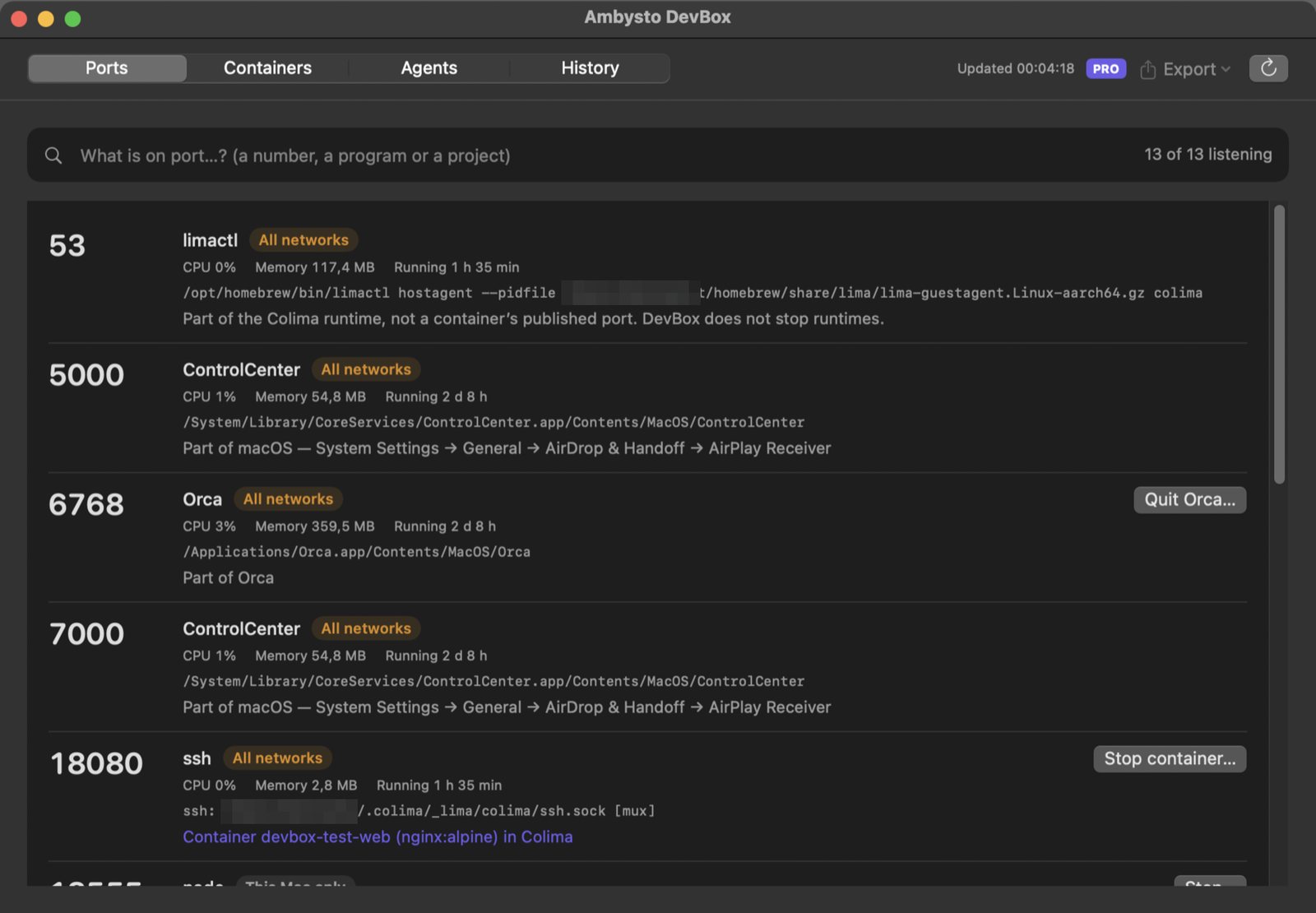
Every port, with its project.
Every TCP listener on this Mac, one row per process and port. Search by number, program or project.
- How far it reaches. This Mac only, one network, or all networks.
- The project. The nearest git folder above the process, shown with
~. - What it belongs to. macOS's AirPlay Receiver on 5000 and 7000, with the setting that turns it off. A container's published port, named by its container.
- Your processes in detail. Other users' listeners show port and name only.
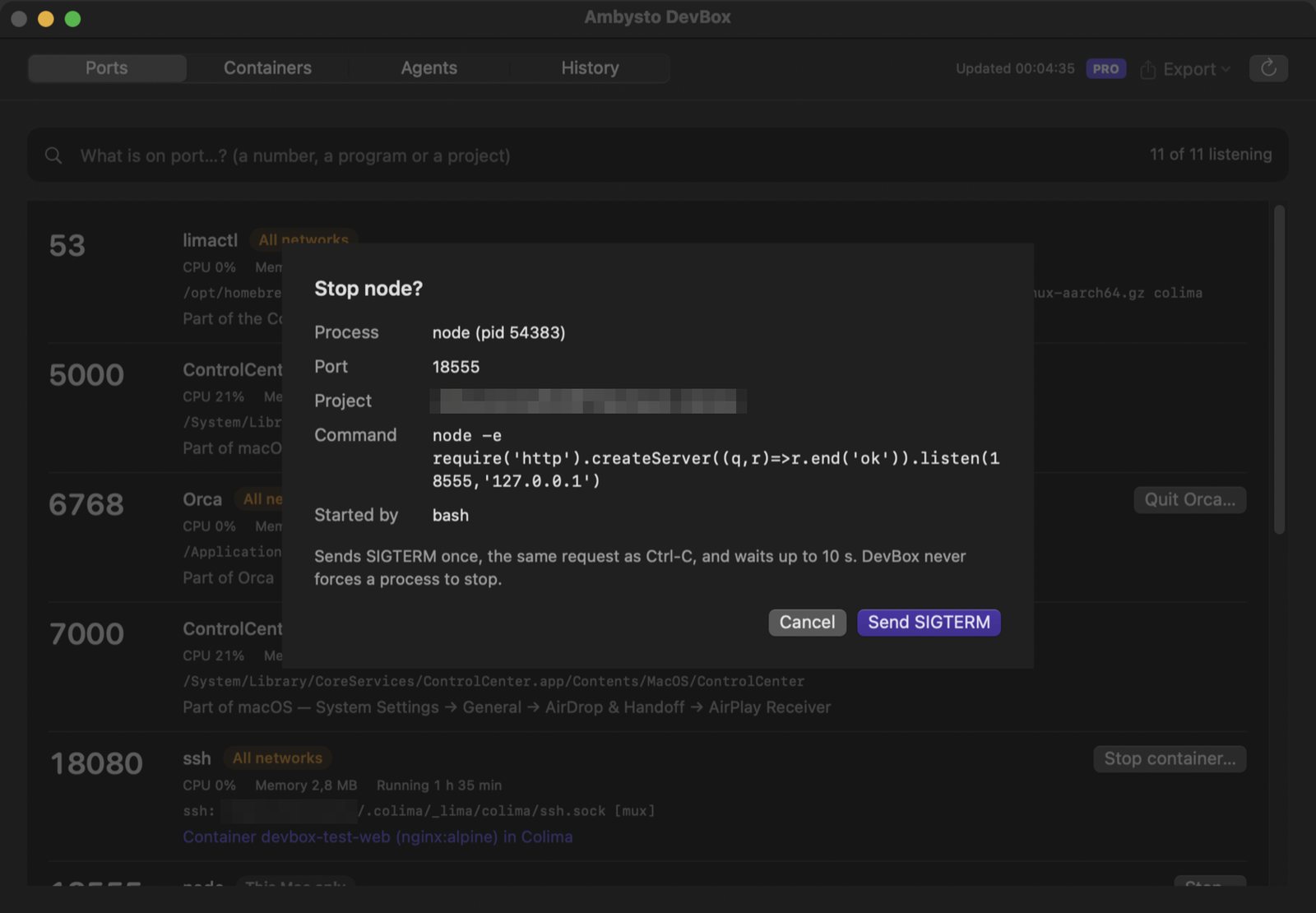
Stop asks first. Never forces.
The polite stop request (SIGTERM), sent once, only after you confirm.
- You see the target. Process, port, project, command line and what started it.
- The right target. If npm, nodemon or a dev server would start it again, the runner is offered instead.
- The same process. Checked again by pid and start time right before sending.
- An honest result. Stopped and the port is free, started again by something else, or still running after 10 seconds.
What your containers keep.
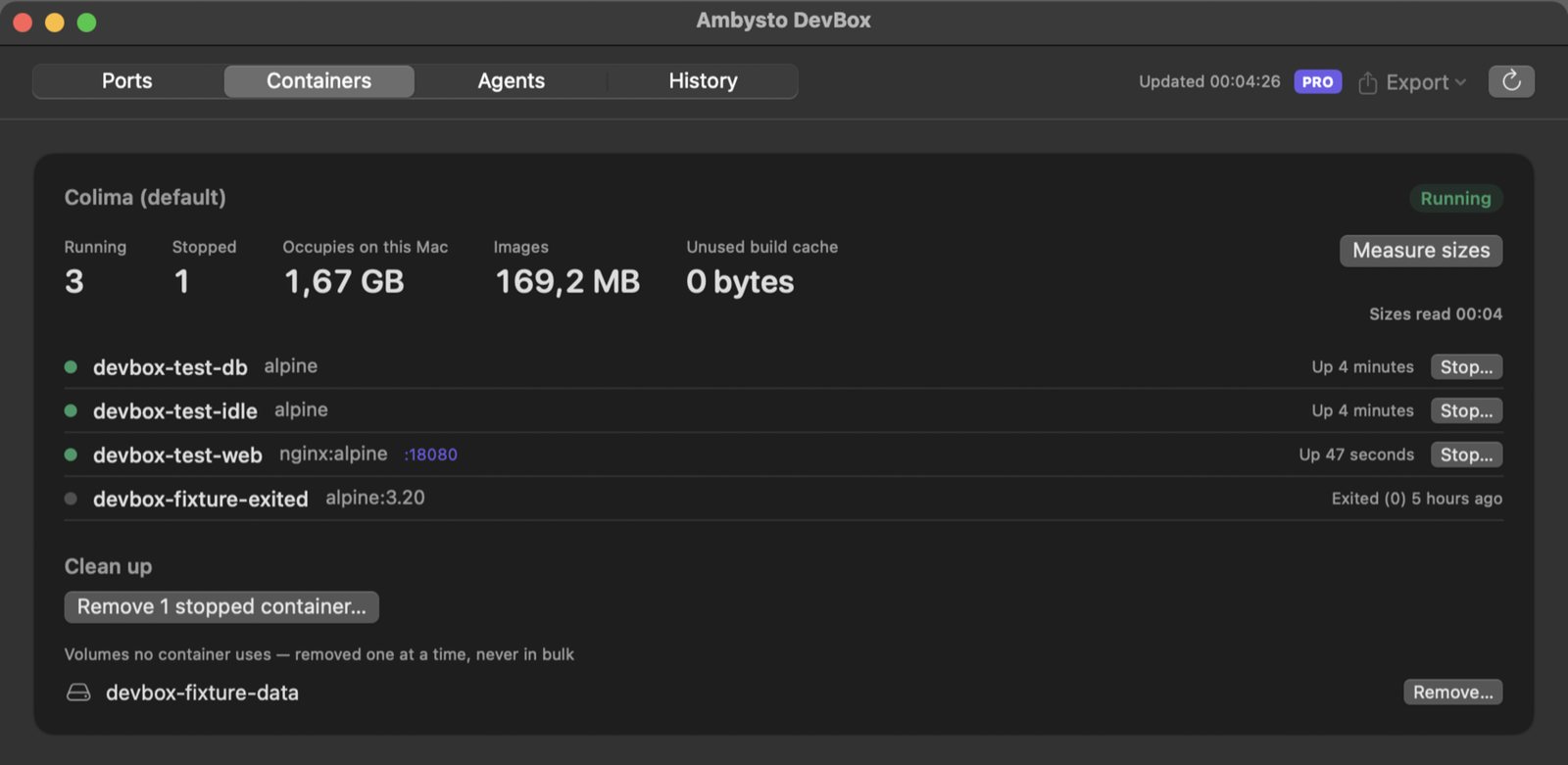
Colima, Docker Desktop and OrbStack. Running and stopped containers, images, build cache, and the space the runtime's disk image takes on your Mac.
- Read-only by default. Sizes come from the Docker Engine API, with read requests only.
- The exact command, shown first. Stop a container, remove stopped ones, clear unused build cache.
- One at a time. Unused volumes are removed one by one, never in bulk.
- Return never removes. A removal sheet has no default button.
Your agents, at a glance.
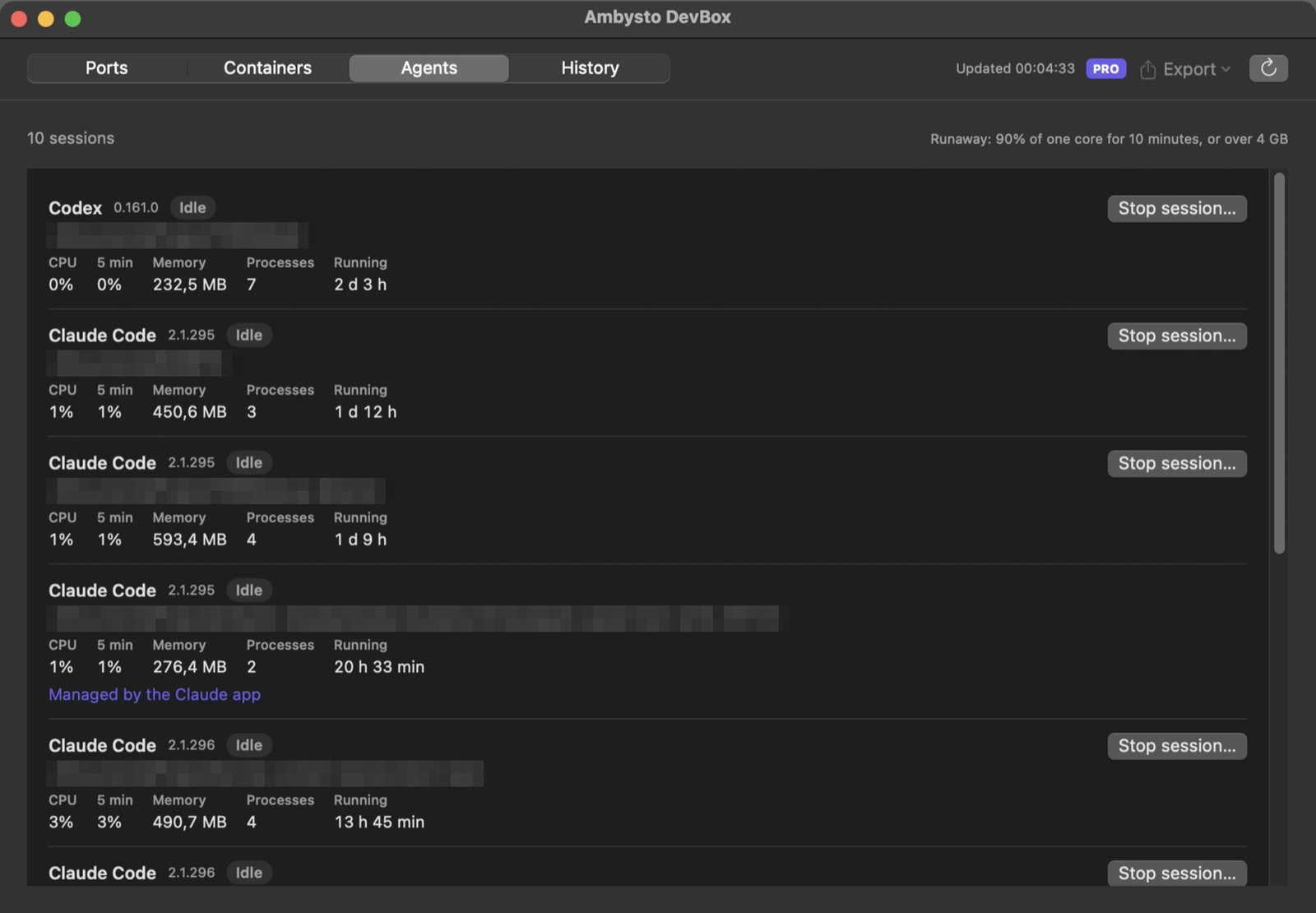
Claude Code, Codex, Cursor, Gemini CLI and Aider. One row per session, with its project.
- Busy or idle. CPU now and over five minutes, memory, processes, and how long it has run.
- Runaway flag. 90% of one core for 10 minutes, or over 4 GB.
- Stop a session. The same polite stop, and anything left running is listed.
- Recognised by path. Your own script called
claudeis not a session.
Safe by construction.
Stopping the wrong process does real harm. So DevBox refuses before it asks.
Never offered a Stop
- macOS services and other users' processes
- Shells, tmux, screen, terminal apps
- Container runtimes themselves
- Sessions run by another app, which point to that app
Never does
- Force-kill, or send a second, stronger signal
- Stop by port number
- Run
system prune,--allor--volumes - Ask for admin rights
- Send anything off your Mac. No account. No network access of its own.
Free works. Forever.
Everything that lists, explains and stops is free. Pro adds what runs while you're not looking.
Free
$0 foreverFind what's running, and stop it safely.
- Ports, containers and AI agents
- Stop, with confirmation
- Container clean-up actions
- Runaway flag in the list
Pro PRO
$19.99 one-timePay once, if DevBox earns it:
- Background alerts: a runaway session, container storage over 20 GB, a new process listening on all networks
- Export of what is running, in Markdown and JSON
- History of ports and sessions, last 7 days, on this Mac only
No subscription, no auto-renewal. Free never expires. Full refund within 14 days of purchase. Alerts only inform; they never stop anything.
Questions
Which Macs does it run on?
macOS 14 or later. Apple Silicon and Intel. It lives in the menu bar, with a window when you want the full lists.
Does it need admin rights?
No. It reads your own processes in detail. Other users' listeners come from netstat, port and name only.
Can it stop the wrong thing?
It checks the process by pid and start time right before sending, refuses system and other users' processes, and only ever sends the polite stop request. A process can still ignore it; DevBox tells you so instead of forcing it.
Does it delete anything?
Only its own Pro history files older than 7 days. Container clean-up runs only the command it showed you and you confirmed.
Does it start or stop Docker or Colima?
No. It detects which runtimes are installed and running, and never starts or stops one.
Is there a Windows version?
Coming. A native app, built from the same written spec.
See what's running right now.
Open the disk image and drag DevBox to Applications. It lives in your menu bar.
macOS 14+ · Apple Silicon and Intel · Free
- Tester build. Not notarized by Apple yet, so the first launch is blocked with "Apple could not verify".
- To open it once: System Settings → Privacy & Security, then Open Anyway next to Ambysto DevBox.